I was a zune user. I had my music organised meticulously and could simply drag and drop to my zune from my (parents) windows desktop. It was simple and it was fantastic.
Then I got a iPod so I needed to download iTunes. I downloaded iTunes, it told me to import my music. I imported my meticulously organised collection. It duplicated every single file into the iTunes approved format (AAC?) - my meticulous collection was now less meticulous, messy even.
It caused me to swear off Apple products for decades. Though it also led me to some very basic programming in order to delete the duplicates. I was only partially successful.
Programming led me to use Linux, before I eventually moved over to Mac. I like to think this was their plan all along.
iTunes for Mac was also awful. I don’t know where the idea comes from that iTunes on Mac was good software but I remember reading that and getting a my first (then Intel) Mac and wondering why it got so much praise on Mac. It was the same software with slightly better UI but generally the same awful UX (except for drivers and performance which was never an issue on Win for me)
As a hobbyist teen I built my own itunes clone for PC from scratch and remember getting so excited when Apple posted a job for someone to port iTunes officially.
I remember getting so excited, then depressed when I realised a hobbyist teenager could never compete with the people Apple would have applying. Later seeing how bizarrely bloated iTunes for PC turned out, guess I probably could have.
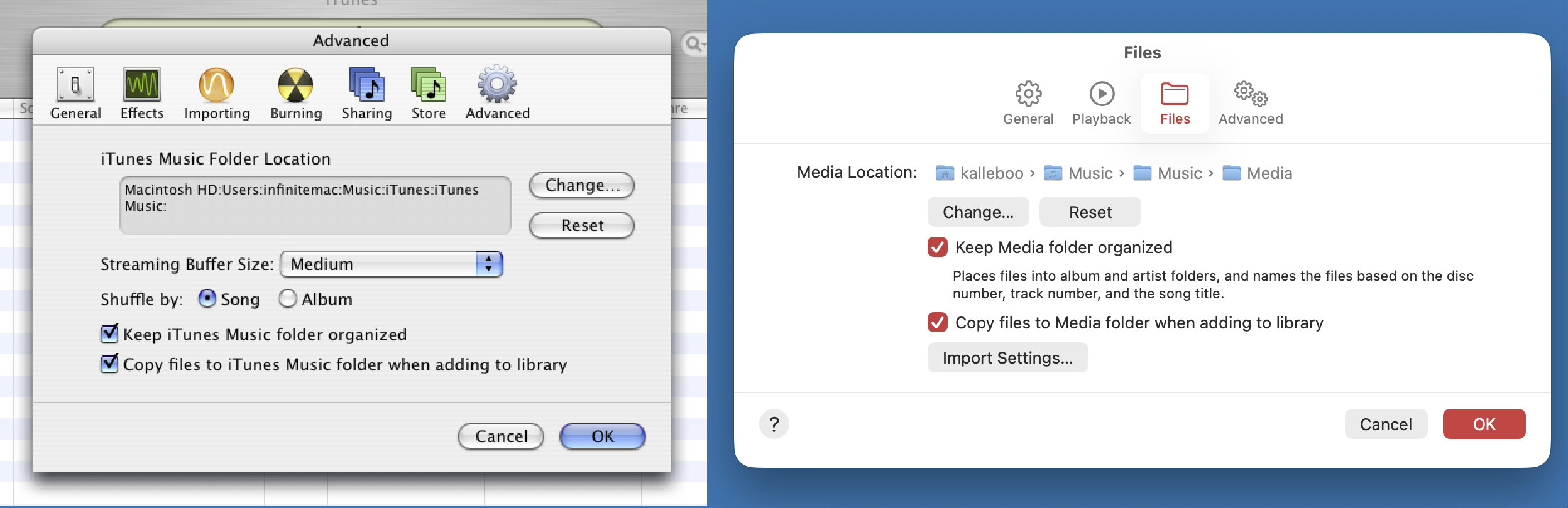
If only you had bothered to check the settings, you would have found the option to keep your music files where they are when adding to the iTunes library. It's been there all along, and it's still there in SoundJam's current reincarnation as Music.app.
I believe that, (possibly only) in the early days, it offered to add any imported music to your library, which I think it indeed did by converting to AAC and putting in a directory structure of its choosing.
It probably could convert to AAC, but the biggest issue for collector nerds with carefully curated collections of mp3's organized in folders by artist and album and with perfect metadata was that iTunes would take all your hard work, shake it around, rename all the files and dump them in a single folder and fuck up your metadata. At least that's how I remember it, but it's over 20 years ago ...
I think the core lesson of the story is knowing if your hobby is listening to music or curating a music collection. Optimize for one or the other.
I went from meticulously curated MP3 collection on Linux to letting iTunes do it for me, and I realized that the meticulous curation and hunting down album art and everything was a hobby I didn't actually love. But if you do love it, great! Different tools for different jobs.
Submitting to iTunes made syncing to the phone much easier, but I've been using claude to rebuild/repair my 20+ year old library, and have learned that iTunes has very weak if any support for "work" - a feature it has to split up classical music the way the CD does (once file per movement). Frustrating that there will likely never be a high-quality syncing player that works well with iPhones.
I remember the trick was to use a network hard disk or drive for the music. iTunes kept the organized folders and all files untouched while building its metadata-only archive in local. But in general, yes, the tendency to mess with your file was built-in.
The trick was to skip the onboarding and go into the Preferences, there was an option there to disable putting your files in the music library folder and messing with the layout
edit: I just compared iTunes 4 and Music in Tahoe and they still have the same preference! It's funny how they clearly did a s/iTunes/Music/, resulting in the "Music/Music" dir https://kalleboo.com/linked/itunes4-vs-musictahoe.png
As I recall it, the AAC option was for syncing to iPods with lower capacity (like the Shuffle) so that it would convert your 320/256kbps MP3s to 128kbps AACs to fit more music. It did this for a copy of them though, I've never heard of it actually converting your main library and checking out an old version of iTunes it has no way of converting your whole library (just individual tracks one by one).
Having iTunes organize your music into its own folder structure was an preference you could turn off, but that option was not shown in the onboarding so it ruined many a people's meticulously organized files...


Then I got a iPod so I needed to download iTunes. I downloaded iTunes, it told me to import my music. I imported my meticulously organised collection. It duplicated every single file into the iTunes approved format (AAC?) - my meticulous collection was now less meticulous, messy even.
It caused me to swear off Apple products for decades. Though it also led me to some very basic programming in order to delete the duplicates. I was only partially successful.
Programming led me to use Linux, before I eventually moved over to Mac. I like to think this was their plan all along.