Everyone loves the "responsive loading" feature, but that's not even the novel thing about the format (JPEG 2000 did it even better — 16 years ago)! The novel feature of this format is better entropy coding.
FLIF decoder adds interpolation to make incomplete scans look nicer than in PNG, but that's a feature of the decoder, not the file format, so there's nothing stopping existing PNG decoders from copying that feature.
Note that it's generally not desirable to have FLIF used on the Web. A decent-quality JPEG will load at full resolution quicker than it takes FLIF to show a half-resolution preview.
FLIF is a lossless format, and lossless is a very hard and costly constraint. Images that aren't technically lossless, but look lossless to the naked eye can be half the size.
e.g. Monkey image from https://uprootlabs.github.io/poly-flif/ is 700KB in FLIF, but 300KB in high-quality JPEG at q=90 without chroma subsampling (i.e. settings good even for text/line-art), and this photo looks fine even at 140KB JPEG (80% smaller than FLIF).
So you want FLIF for archival, editing and interchange of image originals, but even the best lossless format is a waste of bytes when used for distribution to end users.
I agree with all of your comments.
Some remarks though: (Disclaimer: I'm the author of FLIF)
- interpolation is not the only difference between PNG and FLIF in terms of progressive decoding. Another difference is that instead of doing the interlacing on RGB pixels, it does it on YCoCg pixels with priority given to Y, so intermediate steps are effectively chroma subsampled (or in other words you get luma faster at higher resolutions).
- lossless is indeed (currently?) too costly for photographic material on the web, because we can indeed afford some loss and still look good. However, you can still have a lossy encoder that uses a lossless format as a target: e.g. instead of encoding the deltas at full precision, you could throw away some least significant mantissa bits (those behave the most like incompressible noise) and still get visually good results.
- In future work: Progressive JPEG with the Huffman encoding replaced by FLIF's MANIAC entropy coding should be an interesting direction...
> However, you can still have a lossy encoder that uses a lossless format as a target
I wish "lossy-ness" was always an encoder parameter and never an intrinsic property of the container. The world would be a better place if we made this distinction early on. Instead every time a jpeg is edited and resaved the world gets a little more potatoey.
Maybe I am mistaken, but there's no real solution here: either you open a lossy image, edit it and save as lossless (which you easily can do), gaining in size but keeping the quality as is at this point, or (if you want to get smaller image still even after editing lossy image) you must re-encode it as lossy and make image a little more potatoey.
However, as silly as it might seem, I find having a clear distinction between media formats and unique file extension for each a huge usability improvement. A must, basically. I absolutely hate currently existing convention of distributing animated pictures as a webm or mp4 video container w/o audio track. It might seem insignificant: after all, that's what they are — audio-less video files. But because of that I can no longer mv *.gif pictures/animated/. What's even worse, I cannot make my file manager open these "moving pictures" with some other program, because there's no way it could know that it's just looped animation, and not a "real movie".
For the same reason I dislike (even though not that much) formats that can be (and are widely used as) both lossy and loseless while having the same container and file extension.
No, when the format is implicitly lossless then editing and saving is lossless. Discarding more information to make the file compress better is done separately, with a different tool even.
> Note that it's generally not desirable to have FLIF used on the Web. A decent-quality JPEG will load at full resolution quicker than it takes FLIF to show a half-resolution preview.
On the other hand, this allows browsers on metered-bandwidth connections to control bandwidth more effectively. Rather than disabling images entirely, this would allow loading a low-resolution version and stopping, and letting the user control whether to load the rest of the image.
Again, this is not new in FLIF, and it isn't a strength of the format. You're describing exactly what can already be done with progressive JPEG better.
Truncated FLIF looks like a pixelated mess, whereas JPEG at the same byte size is almost like the original (note that the site has encoded JPEG to have few progressive scans, so sometimes you get half image perfect and half blocky. This is configurable in JPEG and could be equalized to entire image being ok-ish).
I wrote a Chrome plugin that does exactly this. I was living in an apartment with a heavily metered connection, and wanted a way to block large header images and 40mb GIFs. The extension let's you set a maximum image size, and uses the HTTP Range header to request only that much of the image - it's pretty naive but it works. Here is an example from Facebook, with the limit set to 10kB:
Unfortunately browsers don't do anything smart in terms of requesting progressive images, as there isn't an easy way to figure out how much of an image should be downloaded. So even on a 320x400px low end mobile device, you'll still end up downloading the whole the 2000x2000 header image - the only difference is it'll appear quicker as it is progressively rendered.
I would love to see this. Instead of network operators throttling bandwidth and/or re-compressing images, set a sane default and let the user have ultimate control.
Presumably if you're using animated GIF you care about compatibility with exotic/older browsers, so at best you'd consider H.264/MP4 or SVG or Flash animations.
Yes, being old/compatible is about the only advantage GIF has ;)
I agree that video formats are more suitable for many animations. Unless you have an animation where lossy is not desirable (e.g. cartoons or technical animations), and you only have pixels, no vectors. In that case FLIF (or APNG/MNG for that matter) can be a good choice.
  >Everyone loves the "responsive loading" feature, but
  > that's not even the novel thing about the format
  >(JPEG 2000 did it even better — 16 years ago)!
That's not quite the same: an interlaced GIF loads with gaps and still requires a fair amount of data to be loaded before it can start displaying.
JPEG 2000's approach provides successively finer detail so the entire image can be rendered after only a small percentage of the total data has been received and then it just becomes sharper as data continues to stream in. If the rollout hadn't been so unsuccessful, this would have been a great answer for responsive images since you could have a single image served (and cached on your CDN) and clients could make ranged requests for the first n bytes based on the displayed size.
JPEG 2000's approach provides successively finer detail so the entire image can be rendered after only a small percentage of the total data has been received and then it just becomes sharper as data continues to stream in.
If you'd ever watched an interlaced GIF arrive over a slow connection, that's exactly how it looks.
I've watched plenty of GIFs trickle in – over a 1200 bps modem back in the day – and it's not the same. An interlaced GIF displays every other line first, leaving a visible comb pattern between the lines until the rest of the data loads which is visually quite distracting unless the background is transparent or a compatible color with the image content.
Here's what interlacing looks like, with whole areas being empty until the data is received:
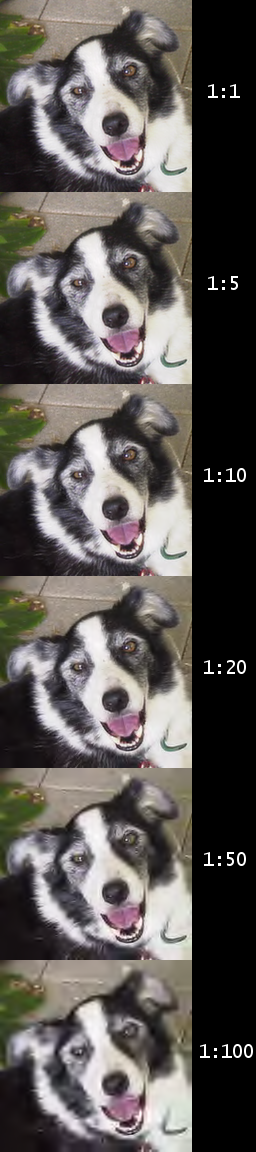
With something like JPEG 2000, you have a completely experience because the image renders immediately with less detail and becomes sharper. Using this example from Wikipedia, it'd basically start with the 1:100 frame on the bottom and rerender as data streams in until hitting the final 1:1 quality at the top:
A lossless format would be great on cameras as the current RAW format has image data which is uncompressed and thus space consuming. Having a really good lossless compression there can save on space and writes.
Most camera raw image files (not RAW, since it's not an extension or a standard) are compressed, and have been for many years now. Some of them (notably the recent Sony standard ARW files, though it's a selectable option in some other brands) even use lossy compression for parts of the data. Yes, the files can take up a lot of space, but not nearly as much as a compressed 16-bit-per-channel RGB TIFF.
Thanks for the note about chroma subsampling. I was already sometimes wondering why some line-art JPEGs had artifacts and others (almost) not. Is there an easy command-line argument to, say, cjpeg to do this? (The manual page doesn't seem to be clear on this?)


FLIF decoder adds interpolation to make incomplete scans look nicer than in PNG, but that's a feature of the decoder, not the file format, so there's nothing stopping existing PNG decoders from copying that feature.
Note that it's generally not desirable to have FLIF used on the Web. A decent-quality JPEG will load at full resolution quicker than it takes FLIF to show a half-resolution preview.
FLIF is a lossless format, and lossless is a very hard and costly constraint. Images that aren't technically lossless, but look lossless to the naked eye can be half the size.
e.g. Monkey image from https://uprootlabs.github.io/poly-flif/ is 700KB in FLIF, but 300KB in high-quality JPEG at q=90 without chroma subsampling (i.e. settings good even for text/line-art), and this photo looks fine even at 140KB JPEG (80% smaller than FLIF).
So you want FLIF for archival, editing and interchange of image originals, but even the best lossless format is a waste of bytes when used for distribution to end users.